Rest In Peace, Adobe and WordPress
I spent 25 years inside Adobe and 17 inside WordPress. This winter I ripped them both out of my stack and never looked back. Here is why, and why if you are still running a 2015 toolchain in 2026, you are not just behind. You are paying a tax for the privilege of being slower than your competition.
This is a manifesto, not a tutorial. If you want a tutorial, the rest of the internet is happy to sell you one for $29 a month.
The Bloat Is the Business Model
Open Photoshop on a modern Mac. Time it. Fifteen to thirty seconds from click to usable canvas, on hardware that boots an entire operating system in under five. That is not a bug. That is what twenty-plus years of feature accretion looks like when nobody at Adobe is empowered to delete anything.
Every Creative Cloud install ships hundreds of features that 95% of users will never touch, loaded into memory whether you asked for them or not, on top of a background daemon that phones home to verify your subscription is still current. The Creative Cloud helper has spawned its own cottage industry of tutorials teaching designers how to kill it without breaking the apps. The most successful creative software company in history has trained an entire generation of designers to fight their own machines just to get work done.
The pricing is where the contempt becomes obvious. Creative Cloud All Apps is roughly $60 a month, $720 a year, every year, forever, with no version you ever actually own. Cancel mid-term and they bill you a 50% early termination fee. I have watched freelancers pay Adobe more in a decade than they paid for the hardware to run it on. This is not a software vendor. It is a rent collector with a logo.
The "professionals need professional tools" argument stopped being true around 2020. Affinity ships Photoshop, Illustrator, and InDesign equivalents as one-time purchases that work offline, do not phone home, and open in under three seconds on the same machine where Photoshop takes thirty. Canva handles 80% of brand and social work in a browser tab. DaVinci Resolve does color grading and editing that used to require a Premiere plus After Effects pipeline, and the free version is more capable than what most agencies were shipping in 2018.
The Adobe moat was switching costs and file format lock-in. The moat is gone. Affinity opens PSDs. Resolve imports anything. Canva exports to every format a printer or platform asks for. The only thing still locking creatives in is the sunk cost of having learned the shortcuts.
I learned the shortcuts. I have been using Photoshop since the version numbers were single digits. Walking away was not nostalgic. It was a relief.
WordPress Was a Career. Now It Is a Liability.
I should be the last person writing this. I have over 500 commercial WordPress installs in my history. I built an entire economy around that platform between 2008 and 2023. Custom themes, custom plugins, multisite networks, e-commerce builds, recovery work after botched migrations, security cleanups after compromised installs. I know WordPress the way a mechanic knows a transmission.
That is exactly why I am the right person to call time of death.
WordPress in 2026 is a 23-year-old PHP codebase carrying every architectural decision it ever made, glued together by a plugin ecosystem where the average install runs 20 to 30 third-party extensions from 20 to 30 developers with 20 to 30 different update schedules, security postures, and abandonment risks. Every plugin is an attack surface. Every one is a dependency you do not control. Every one is a subscription somewhere in the bill.
The economics of "standard" WordPress in 2026 look like this. Hosting at $30 to $200 a month. A premium theme license. WP Engine or Kinsta if you want it to actually stay up. An SEO plugin subscription (RankMath, SEOpress, or, may God help you, Yoast). Backup plugin. Security plugin. Forms plugin. Caching plugin. Page builder. A developer on retainer to fix it when one auto-update inevitably breaks another. By the time you tally it, a "free" CMS is costing a small business $5,000 to $15,000 a year in tooling and labor before anyone writes a single piece of content.
This is the Legacy Tax. You are not paying for the platform. You are paying for the platform's accumulated debt.
The security story is worse. WordPress and its plugin ecosystem account for a substantial majority of CMS-related breaches every year, and the pattern is always the same. A plugin nobody is actively maintaining ships a vulnerability. The patch comes weeks later. The site owner does not auto-update because the last auto-update broke their page builder. Eventually someone scans for the vulnerability and the site gets defaced, ransomed, or quietly turned into a node in a spam network. The site owner pays a developer four figures to clean it up. Nothing fundamental changes. The cycle repeats.
The page builder era made it worse. Elementor, Divi, and the block editor itself produce bloated HTML that bleeds Core Web Vitals, hurts SEO, and creates dependencies on the builder's specific markup that turn future migrations into nightmares. A "modern" WordPress site in 2026 ships more JavaScript than most React applications and takes longer to load than a fresh Next.js build on free Cloudflare hosting.
I built a career on this platform. I am not bitter about it. But the era is over, and pretending otherwise is malpractice.
What I Migrated To, And Why It Is Better
The replacement stack is built on a simple principle. Every site should be a purpose-built application designed around what the company actually needs, not a generic CMS bent into shape by a stack of plugins that mostly fight each other.
The toolchain:
Antigravity is Google's agentic development IDE, released this year. It lets a developer pair-program with multiple AI agents that plan, write, test, and iterate in the same workspace. For a forward-deployed architect, it compresses what used to be a week of scaffolding into an afternoon.
Claude Code is Anthropic's terminal-native coding agent. It is the workhorse for the actual building: architecture, refactoring, debugging, integration. When I need a custom CMS module that does exactly one thing for exactly one client, Claude Code writes the first 80% while I steer.
Cloudflare Pages and R2 are where the sites live. Pages is a static and serverless hosting platform that deploys in seconds and scales globally for free at small-business traffic volumes. R2 is the storage layer, S3-compatible without egress fees, which is the single biggest hidden cost in AWS S3 that most developers do not catch until their first viral month.
Google Cloud and AWS handle anything that needs heavier compute, database, or queue infrastructure. Used surgically, not as the default.
What does this produce? A custom CMS, built for the specific company.
At Barnes Walker Law Firm, I built a CMS that is not really a CMS in the traditional sense. It is a Command & Control Center for the firm's digital operation. The sidebar tells you everything you need to know about the philosophy: Operations, Intelligence, System. Not "Posts, Pages, Comments." The SEO Center surfaces live Search Console data, 13,020 clicks and 5 million impressions across the last 28 days, with the top 25 queries ranked by performance. The 404 Monitor catches broken links before they cost rankings. The Web Security panel flags issues with a red badge the moment they appear. The Lead Inquiry queue shows three pending intakes ready for the firm to process. Every page on the public-facing site exists because it serves a specific practice area, a specific lead capture, or a specific compliance requirement. There is no "pages section" with 200 unused page types. There is no plugin directory. There is no Yoast banner asking me to upgrade. The thing does exactly what the firm needs, and it does it fast.
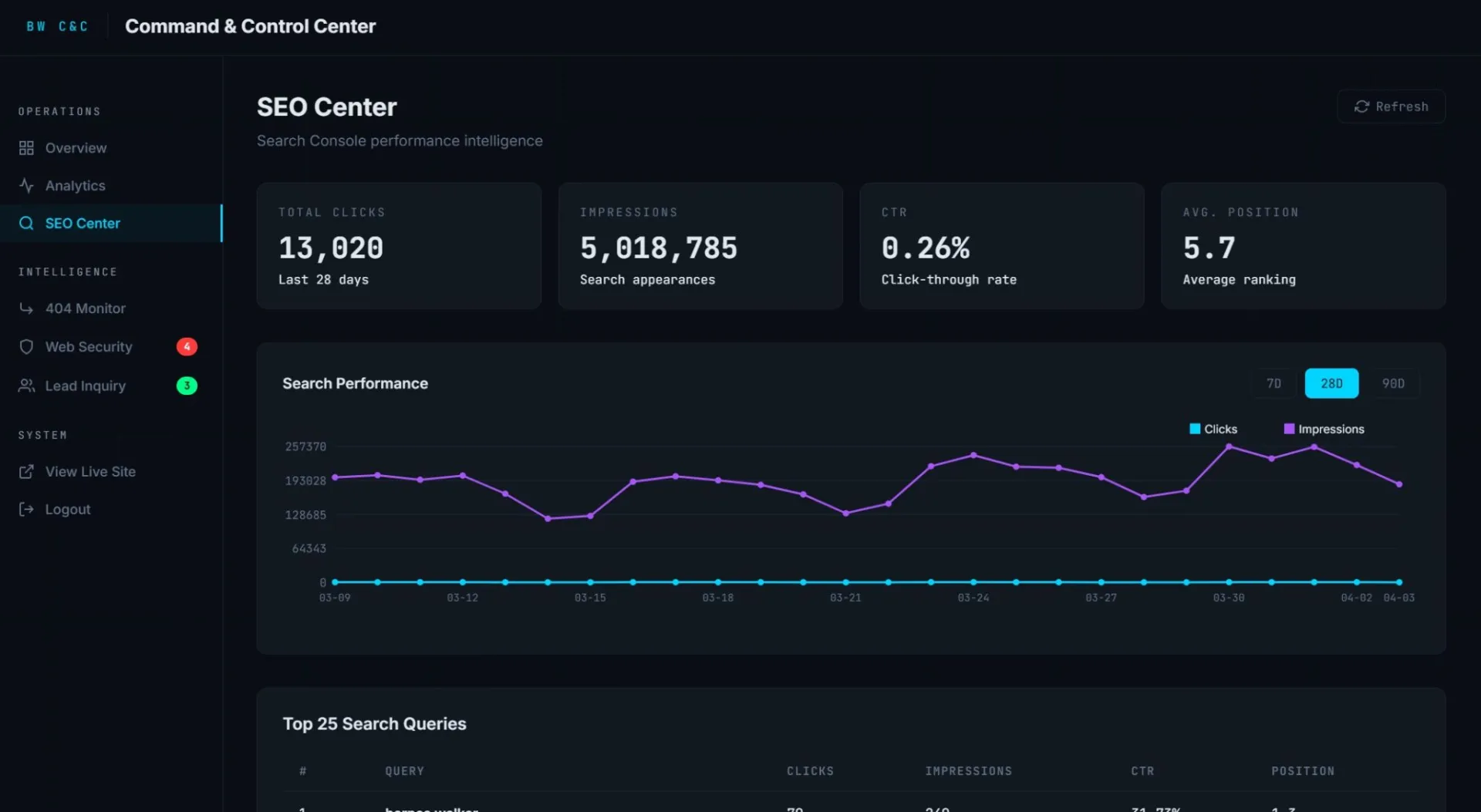
No two of these CMS builds look alike, because no two businesses have the same operational shape. A law firm is not a music studio. A music studio is not a private aviation operator. The "one CMS to rule them all" thesis is what produced the WordPress mess in the first place. The way out is the opposite: a CMS per company, designed around the specific decisions the company needs to make and the specific data it needs to surface.
This is what agentic-driven development makes economically possible for the first time. Five years ago, a custom CMS for a single client meant six figures and three months. Today, with the right toolchain and the right architect at the keyboard, it is days to weeks at a fraction of the cost, and the resulting product is faster, more secure, easier to maintain, and 100% owned by the company that paid for it.
The SEO piece is the same story. Instead of installing Yoast and letting a plugin author dictate the structure of your metadata, I embed agentic search logic directly into the build. Schema markup, sitemap generation, internal link optimization, content gap analysis, all of it lives in the codebase, not in a plugin that might be sold to a private equity firm next quarter and turned into a SaaS shakedown.
The Real Cost of Standing Still
If you are running a 2015 stack in 2026, here is what you are actually paying for.
You are paying Adobe to rent you tools that boot slower than the alternatives and lock your files into a format ecosystem that no longer protects you.
You are paying WordPress hosting plus a stack of plugin subscriptions plus a developer on retainer to keep a 23-year-old codebase functional in a world that has moved on.
You are paying in performance. Slower sites. Worse Core Web Vitals. Lower conversion rates. SEO rankings that drift downward every quarter as Google rewards speed and penalizes bloat.
You are paying in security risk. Every plugin you do not control is a breach waiting to happen on someone else's schedule.
You are paying in opportunity cost. Every hour your team spends fighting your tools is an hour they are not spending on the work that moves the business.
The dinosaurs did not die because they were bad at being dinosaurs. They died because the environment changed and they could not. Adobe and WordPress are products built for an environment that no longer exists, and the cost of pretending otherwise is showing up on every invoice, every page-speed report, and every security audit.
I moved on this winter. The work is faster, sharper, cheaper to maintain. The clients are happier. The bills are smaller. The output is better.
If you are still on the old stack, you are not just behind. You are overpaying for a handicap.
The old guard is gone.
Frequently Asked Questions
Why should I stop using Adobe Creative Cloud?+
Adobe Creative Cloud costs roughly $720 a year with no ownership, ships hundreds of features most users never touch, boots slowly on modern hardware, and locks files into proprietary formats. Alternatives like Affinity offer one-time purchases that open in seconds, work offline, and handle the same file formats without the subscription tax.
What is wrong with WordPress in 2026?+
WordPress in 2026 carries 23 years of architectural debt, requires 20-30 third-party plugins that each represent an attack surface and a subscription cost, produces bloated HTML from page builders that hurts Core Web Vitals and SEO, and costs small businesses $5,000 to $15,000 a year in hosting, plugins, and developer retainer before any content is written.
What replaces WordPress for small business websites?+
A purpose-built custom CMS designed around the specific company's operational needs, deployed on platforms like Cloudflare Pages with serverless infrastructure. Built using agentic development tools like Antigravity IDE and Claude Code, these custom systems are faster, more secure, cheaper to maintain, and fully owned by the business.